The Capital One Shopping browser extension and mobile app are essential tools for finding deals, applying automated coupon codes, and comparing retailer prices.
You do not need to compromise your digital privacy to access these benefits.
This guide walks you through setting up a verified account using an authentic US line from the Non-VoIP platform, allowing you to access all shopping rewards while keeping your personal phone number completely protected.
Quick Summary (TL;DR):
To create Capital One Shopping account without using your personal phone number, the Non-VoIP platform provides authentic, carrier-backed US lines that reliably clear verification checks without ban risks.
The process involves logging in, selecting the "Capital One Shopping" service, choosing an affordable US server, and entering the provided number into the app to receive your verification code instantly on your dashboard.
Your balance is protected by an automated refund policy if no SMS arrives.
What Exactly is Capital One Shopping?

Simply put, Capital One Shopping is a completely free tool designed to help you save money while shopping online. You don’t even need to be a Capital One bank customer to use it.
It acts as an intelligent assistant that accompanies you on your shopping journey, offering a range of powerful features:
- It automatically searches for the best available discount codes (coupons) and applies them to your order when you reach the checkout page in online stores.
- It compares prices across different stores to tell you if the product is available at a lower price elsewhere, factoring in shipping fees, taxes, and any additional costs.
- It lets you track product prices by adding items to a “Watchlist” to alert you when the price drops.
- It offers a Shopping Rewards program that lets you earn credit that can be redeemed for gift cards from popular stores.
- It supports thousands of major retailers like Amazon, Walmart, Target, and others.
- It works on browsers like Google Chrome, Firefox, Safari, and Microsoft Edge.
Read more: The Importance of US Numbers Temporary and Monthly
Why is Non-Voip the best solution?
Non-Voip stands out with a range of features that make it the ideal and reliable solution for this task, providing you with a safe and effective experience to create capital one shopping Account
- Quality Numbers: All provided numbers are real numbers, not virtual ones.
- Absolute Privacy: The number you use is for one-time verification only.
- Credibility and Trust: If you don’t receive the activation code when using the number, you can get a refund for the credit you paid, reflecting the site’s commitment to fair and transparent service.
- Excellent Customer Service: The site provides a support team ready to handle any issue you might face, ensuring a frustration-free experience.
- Diverse Payment Methods: The site offers payment methods that suit various categories (crypto, Kazawallet), making it accessible to everyone.
- Simplicity and Speed: The entire process takes only a few minutes.
Steps to Create Capital One Shopping Account Without Phone Number
Steps to activate Capital One Shopping via a US number:
Stage 1: Buying the Number from Non-VoIP
Start a New Order: From the main menu of the platform, click "New number" or click the "New Verification" button located in the top bar of the dashboard.
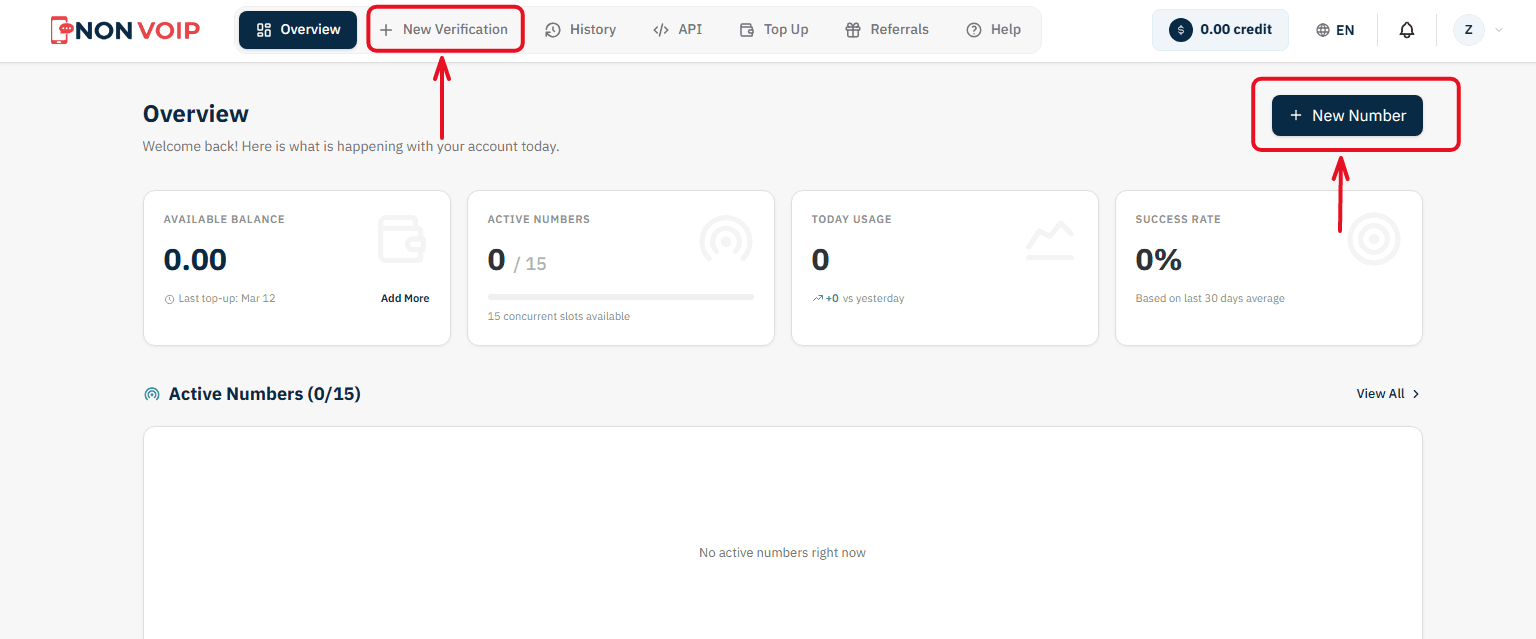
Select a Service: A list of available applications will appear. Search for and select "Capital One Shopping". (You can click the star icon next to it to add it to your "Favorites" list for quick access later).
Select Country: From the list of supported countries, choose the United States.
Select a Server: The platform will display several available servers for this service (e.g., Server 1, Server 2). Each server details the cost, validity period, and support for additional features like reuse. Choose the server that fits your budget.
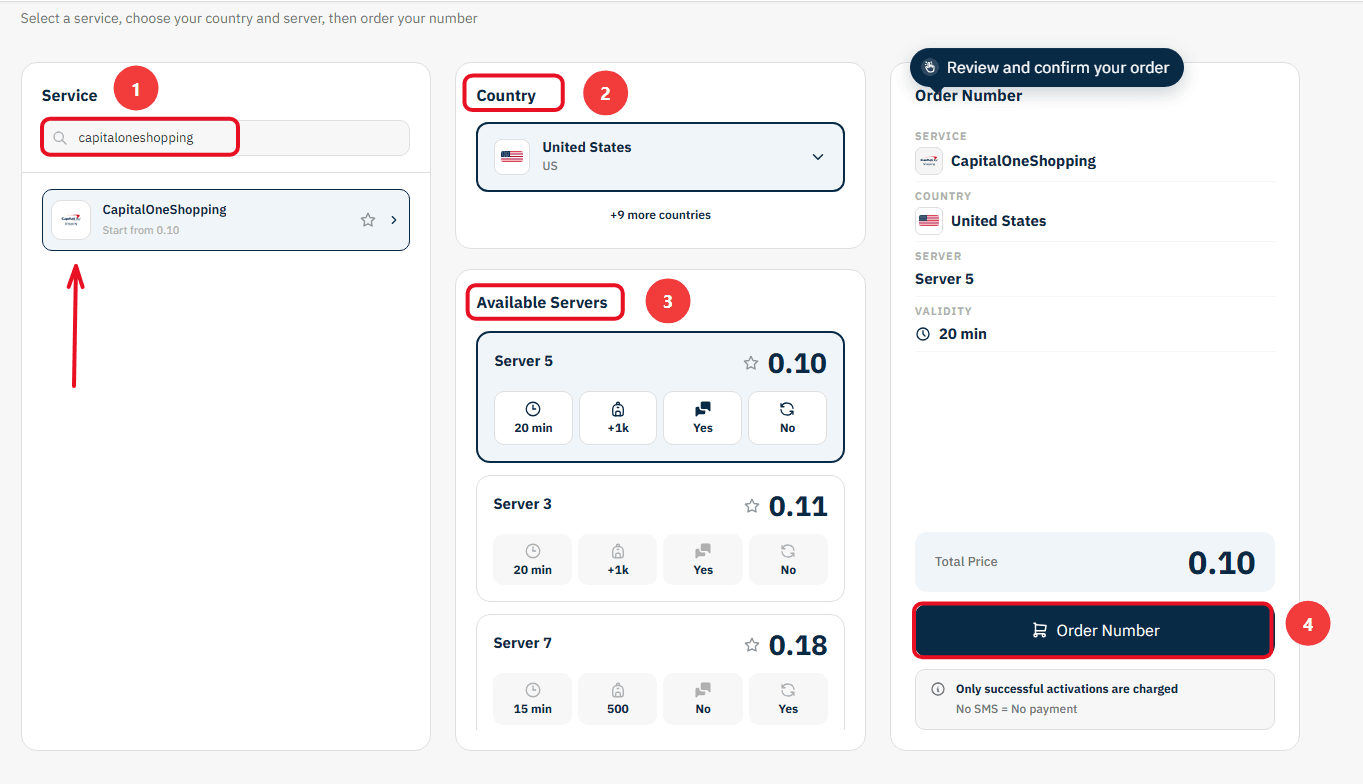
Confirm the Order: On the right section, you will find a comprehensive summary of your order. Review the details, then click "Order Number" to immediately allocate a real US number to you and start the waiting session.
Stage 2: Activating the Number in the Capital One Shopping App
Now you are ready to link the number to your new account:
Open the Capital One Shopping app on your phone and start the steps to create a new account.
Copy the phone number displayed on the order card on the Non-VoIP platform and paste it into the phone verification field inside Capital One Shopping.
Return directly to the platform's dashboard and monitor the order card; you will see a timer showing the remaining time under the status "Awaiting SMS".
Once the Capital One Shopping activation code arrives, it will appear immediately in the "SMS Message" field. Copy the code and enter it into the app to complete the process successfully.
Important Note: The platform offers absolute financial transparency. You can manually cancel the number before the message arrives, and if the timer expires without receiving the code, the balance will automatically return to your account according to the "No SMS = No payment" policy, allowing you to try another server.
Conclusion
In the end, smart shopping isn’t just about finding the best price; it extends to protecting your personal data. You no longer have to trade getting great discounts for maintaining your privacy.
By using specialized tools like Non-Voip, you can take full advantage of everything Capital One Shopping has to offer with complete confidence, knowing that your digital identity remains yours and yours alone.
Read more: How to Create Match Account Without Phone Number in 2025