
Yahoo requires a real phone number to complete registration. To bypass this obstacle and create Yahoo email without phone number, use a Real Non-VoIP number. This service ensures you receive the verification code (SMS) instantly and activates your email successfully without needing your personal SIM card.
Is it possible to create a Yahoo account without a phone number?
It isn’t possible to create a Yahoo account without a phone number. In addition to the email address, the website also requires a phone number to register the account.
But that does not make it impossible. Using temporary real numbers provided by services such as Non-VoIP, you can buy a number temporarily from another country to use when registering.
This option keeps your privacy intact without having to disclose your personal phone number.
Why Does Yahoo Mail Insist on Requesting a Phone Number?
As one of the world’s oldest and largest email providers, Yahoo has implemented strict security measures, making a phone number a fundamental requirement for:
- Identity Verification: Ensuring the creator is not a bot or a random spam account.
- Account Recovery: The most reliable way to regain access to your email if you lose your password.
- Enabling Security Features: Such as Two-Factor Authentication (2FA).
Why are Non-VoIP Numbers the Solution for Yahoo?

Temporary phone numbers, or impersonal real numbers, are numbers that you may use to get SMS messages without giving out your real phone number.
The Non-Voip service has an expansive range of virtual numbers in a wide range of countries, making it the ideal solution to bypass the phone number requirement when setting up to create a Yahoo email.
Benefits of having temporary phone numbers Non-Voip:
- Privacy: You do not need to supply your personal phone number to Yahoo.
- Flexibility: You can choose temporary or permanent numbers either from the United States or other countries.
- Ease of use: The process is relatively simple and does not require technical knowledge.
Read more: The Importance of Temporary and Monthly US Numbers and How to Profit from Them.
How to create Yahoo email without phone number?
If you would rather create Yahoo account without phone number, the following are the steps that you can take:
- Go to the official Yahoo website and click on “Create a new account.”

- Fill in the required information, such as your name, date of birth, and the email address you wish to create.
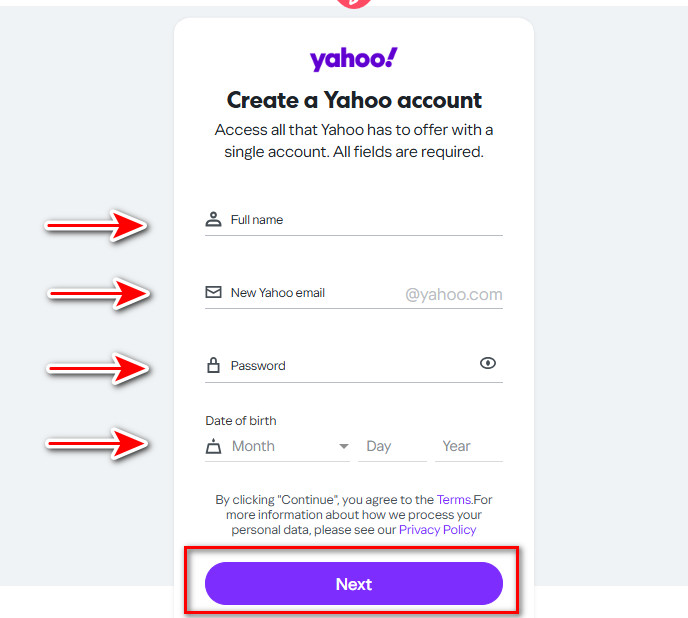
- When you reach the step requesting a phone number, go to the official Non-Voip website.
- You will need to log in using your current account credentials. If you don’t have an account on Non-VoIP, you’ll need to create one first.
- Click on the “New Veritication” section on the website.

- Use the search bar, usually located at the top of the homepage. Type “Yahoo” in the search bar and press the search button.
- Click on the “New Veritication” button.
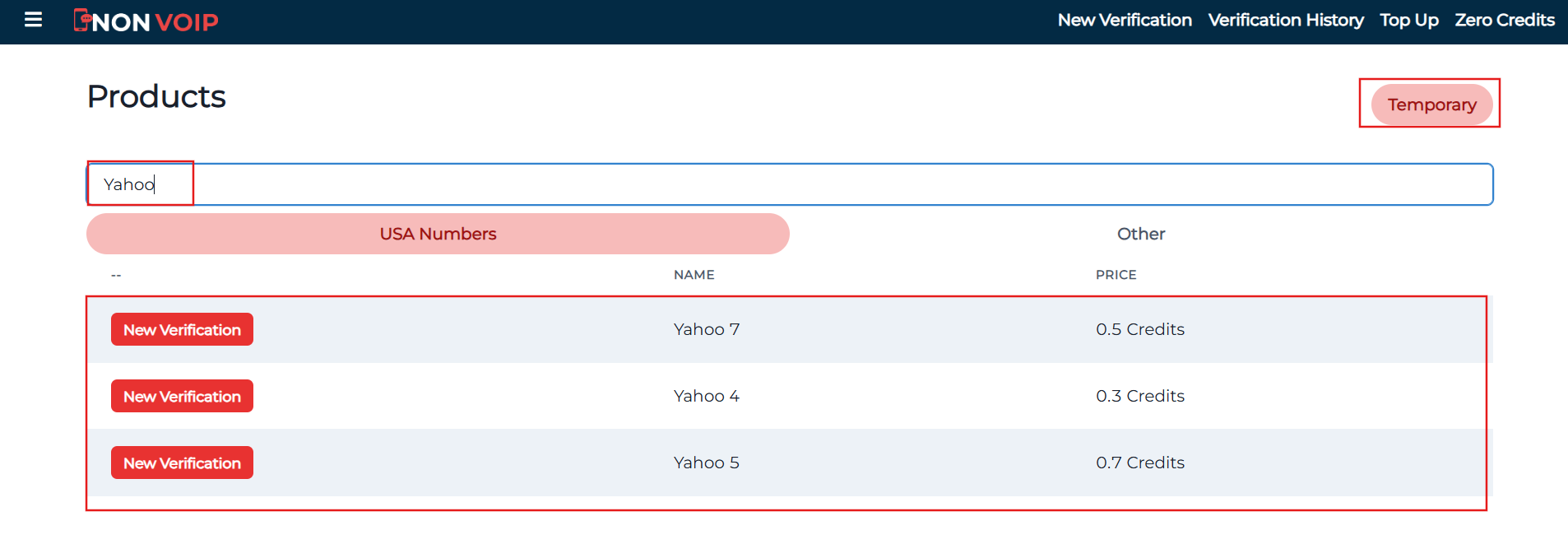
- Return to Yahoo and enter the number you obtained.
- After entering the Non-VoIP number in Yahoo, you will receive a message containing the verification code.
Frequently Asked Questions:
Can Yahoo Mail be used without a phone number?
Unfortunately, no. The verification step using a phone number is mandatory. Yahoo sends a confirmation code via SMS to the number entered during registration. This step aims to verify the user’s identity and enhance security.
Can the phone number verification step be skipped for Yahoo Mail?
No, it cannot be skipped. Yahoo relies on phone number verification as part of its strict security policies to protect accounts from hacking or unauthorized use.
Where can you get a virtual number for Yahoo Mail?
You can purchase temporary real numbers through the Non-VoIP platform. After completing a quick and simple registration on the website, you will be able to choose a suitable virtual number from the available options.
Conclusion:
Although Yahoo does require a phone number upon sign-up, Non-VoIP provides a workable solution to this mandate.
By following the above steps, you can create Yahoo email without having to provide your actual phone number.