Joining OkCupid is the start of a new and exciting journey, but the first and most important step is to build your profile in a way that protects your private space.
Before you share any personal information, especially your phone number, it’s important to know how you can control your digital footprint and create OkCupid account without phone number.
Quick Summary (TL;DR):
To create OkCupid account without phone number and safeguard your digital privacy with the Non-VoIP platform supplies real, carrier-backed US numbers.
The process simply requires logging into the dashboard, selecting the "Okcupid" service, choosing a suitable US server, and entering the assigned number into the app to receive your verification code instantly inside the console
backed by an automatic refund policy if no message arrives.
Why Doesn’t Your Personal Phone Number Belong on Your Dating Profile?
It is always wise to create a barrier between your public online life and your private life. Using your personal phone number in a dating app breaks this barrier and can lead to:
- Linking your OkCupid profile to your real identity on other platforms, as a phone number can easily be used to search for your other social media accounts.
- Difficulty controlling who can contact you outside the app, which could expose you to harassment or unwanted messages.
- Revealing sensitive personal information at a very early stage of getting to know someone, before trust has been built.
Steps to Create OkCupid Account Without Phone Number Using Non-Voip?
Follow these simple steps to get a phone number to activate OkCupid securely and efficiently:
Stage 1: Buying the Number from Non-VoIP
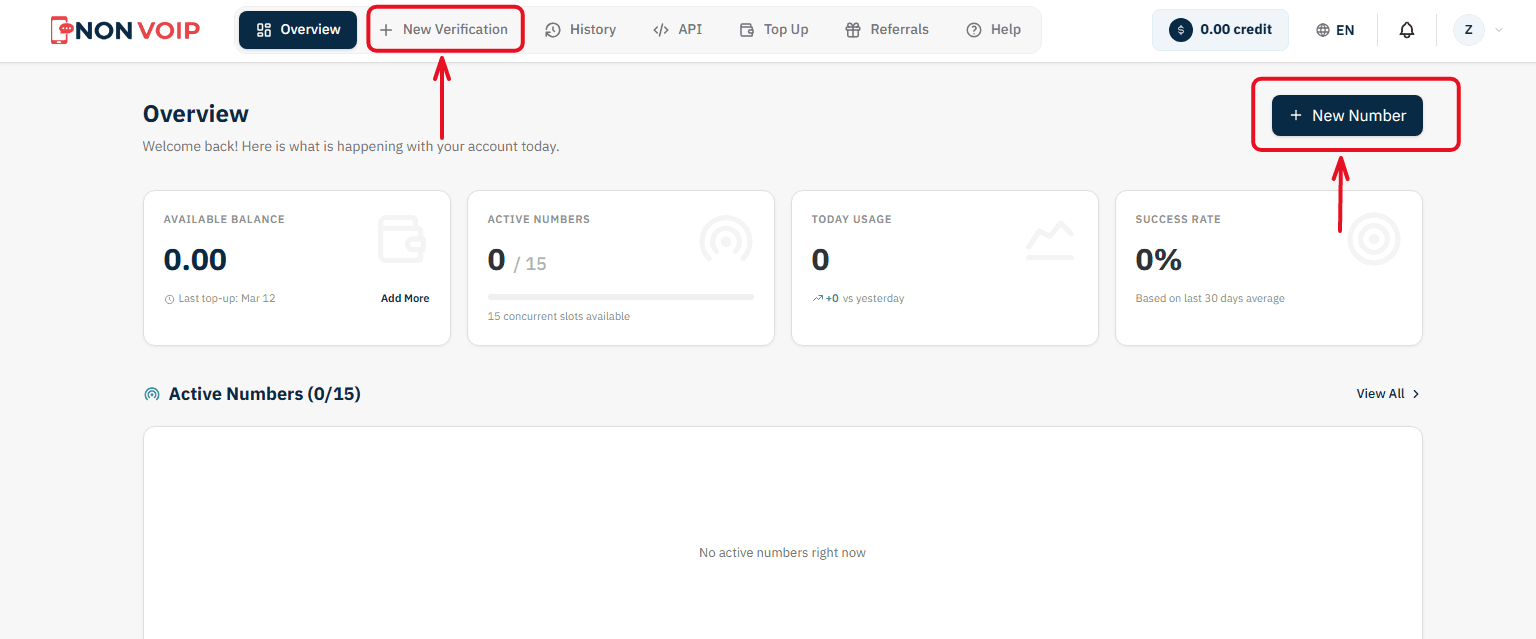
Start a New Order: From the main menu of the platform, click "New number" or click the "New Verification" button located in the top bar of the dashboard.
Select a Service: A list of available applications will appear. Search for and select "Okcupid". (You can click the star icon next to it to add it to your "Favorites" list for quick access later).
Select Country: From the list of supported countries, choose the United States.
Select a Server: The platform will display several available servers for this service (e.g., Server 1, Server 2). Each server details the cost, validity period, and support for additional features like reuse. Choose the server that fits your budget.
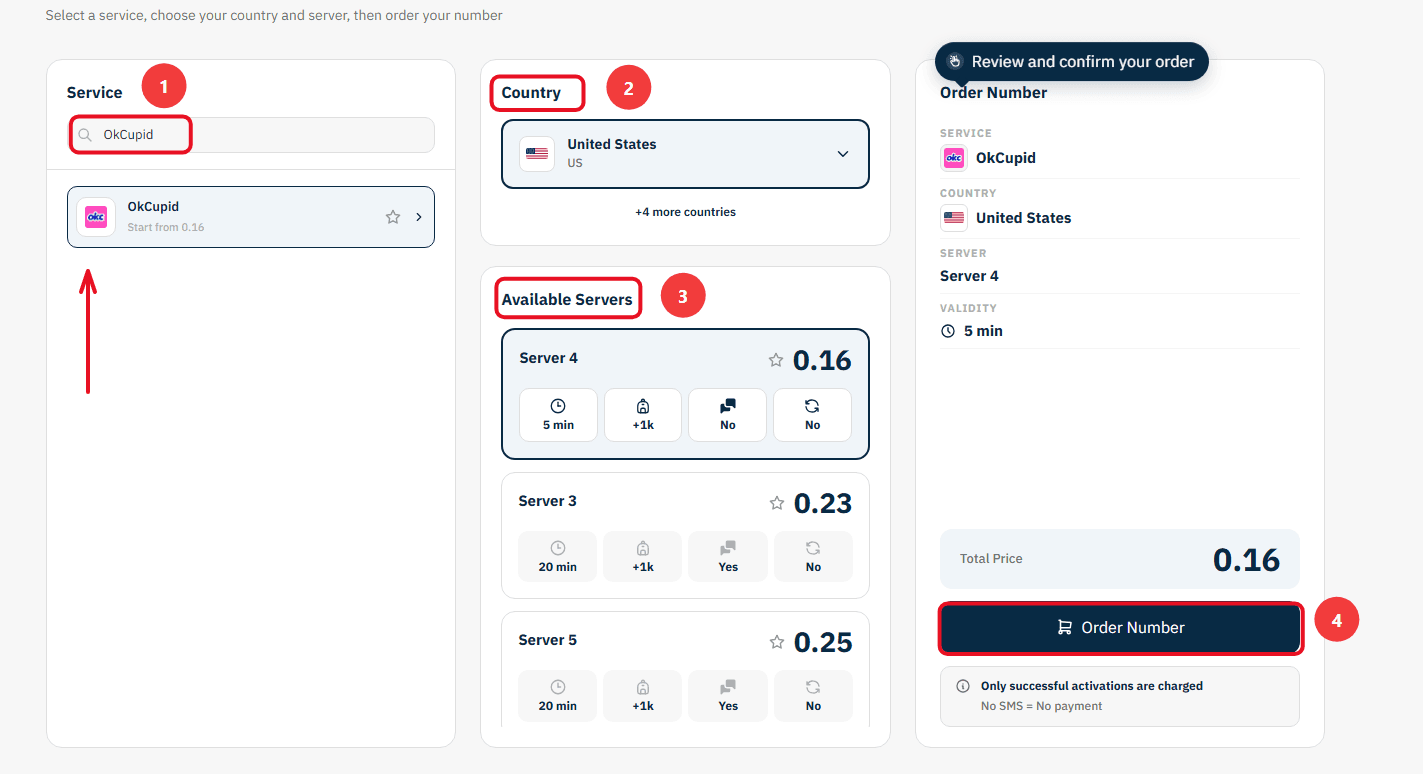
Confirm the Order: On the right section, you will find a comprehensive summary of your order. Review the details, then click "Order Number" to immediately allocate a real US number to you and start the waiting session.
Stage 2: Activating the Number in the Okcupid App
Now you are ready to link the number to your new account:
Open the Okcupid app on your phone and start the steps to create a new account.
Copy the phone number displayed on the order card on the Non-VoIP platform and paste it into the phone verification field inside Okcupid.
Return directly to the platform's dashboard and monitor the order card; you will see a timer showing the remaining time under the status "Awaiting SMS".
Once the Okcupid activation code arrives, it will appear immediately in the "SMS Message" field. Copy the code and enter it into the app to complete the process successfully.
Important Note: The platform offers absolute financial transparency. You can manually cancel the number before the message arrives, and if the timer expires without receiving the code, the balance will automatically return to your account according to the "No SMS = No payment" policy, allowing you to try another server.
In Conclusion
When you control your personal information, you can enjoy the dating experience more fully and honestly, assured that your private space is secure.
This simple step gives you the confidence needed to focus on what truly matters: building relationships that are right for you.
Read More: Create a BlackPeopleMeet Account Without a Phone Number