If you are looking to create a WhatsApp account without a phone number, obtaining a real US number is the most practical solution to enhance your digital privacy and give a professional touch to your client communications.
Many people rely on free virtual numbers, but they are often quickly banned and prevent you from completing the registration.
TL;DR
To create a WhatsApp account without using a personal phone number, you can rely on the Non-VoIP platform to get a real US number and safely bypass bans.
The method simply involves logging into the platform, selecting the "WhatsApp" service, choosing a US server that fits your budget, then copying the allocated number and entering it into the app to instantly receive the activation code within the dashboard.
This ensures you start working professionally and protect your privacy with zero financial risk.
Benefits of Activating WhatsApp with a US Number
Why do professionals and privacy-conscious users prefer a US number over a local one?
Professional Appearance for Freelancers: Communicating with international clients using a US number gives you high credibility and creates the impression of operating within an organized business environment.
Total Privacy: Completely separating your personal identity and local number from new clients and strangers.
Security Protection: Reducing reliance on your primary number protects your personal data and linked accounts from targeting attempts.
Exclusive Features: Accessing Meta AI features directly within the app.
Read Also: How to earn 5$ a day through Survey Junkie
Steps to Create a WhatsApp Account Without a Phone Number
Follow these simple steps to create a WhatsApp Account Without a Phone Number:
Stage 1: Buying the Number from Non-VoIP
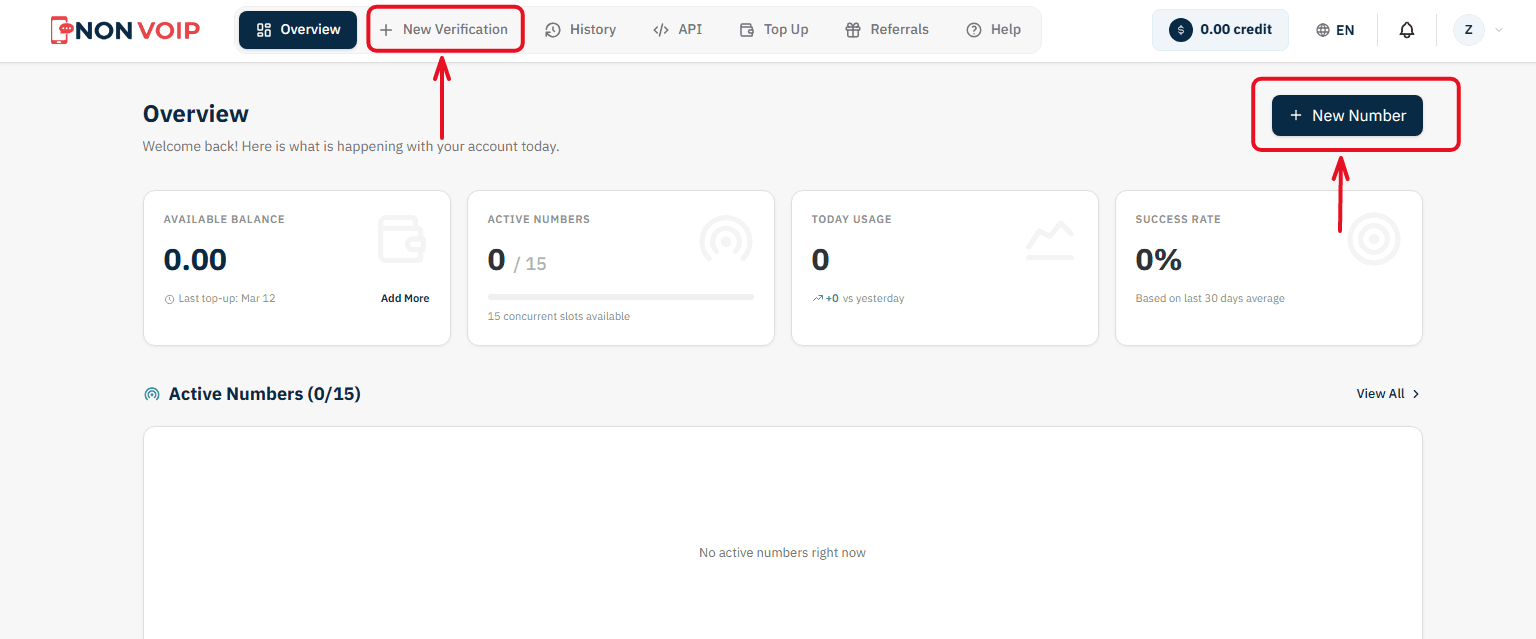
Start a New Order: From the main menu of the platform, click "New number" or click the "New Verification" button located in the top bar of the dashboard.
Select a Service: A list of available applications will appear. Search for and select "WhatsApp". (You can click the star icon next to it to add it to your "Favorites" list for quick access later).
Select Country: From the list of supported countries, choose the United States.
Select a Server: The platform will display several available servers for this service (e.g., Server 1, Server 2). Each server details the cost, validity period, and support for additional features like reuse. Choose the server that fits your budget.
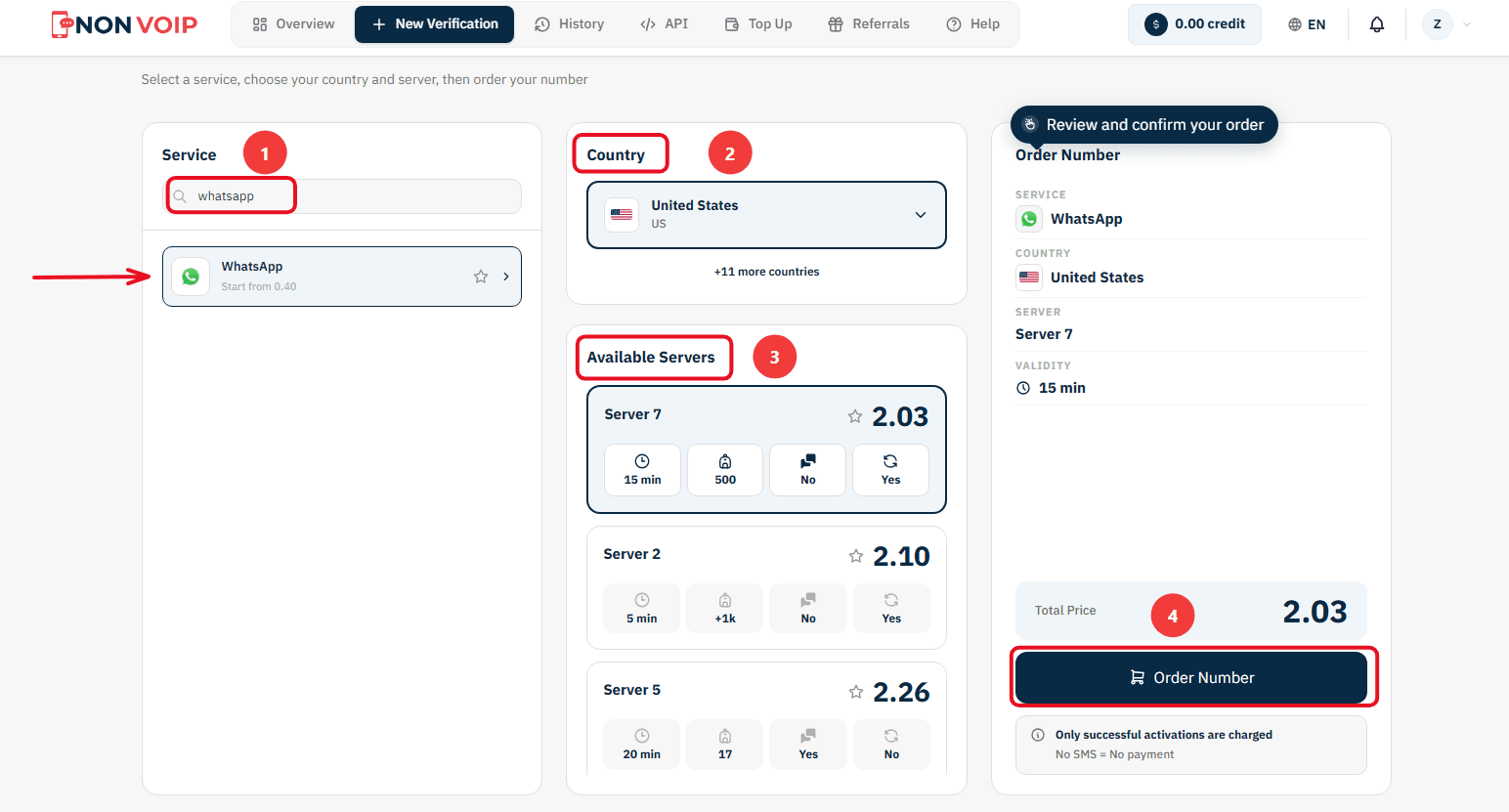
Confirm the Order: On the right section, you will find a comprehensive summary of your order. Review the details, then click "Order Number" to immediately allocate a real US number to you and start the waiting session.
Stage 2: Activating the Number in the WhatsApp App
Now you are ready to link the number to your new account:
Open the WhatsApp app on your phone and start the steps to create a new account.
Copy the phone number displayed on the order card on the Non-VoIP platform and paste it into the phone verification field inside WhatsApp.
Return directly to the platform's dashboard and monitor the order card; you will see a timer showing the remaining time under the status "Awaiting SMS".
Once the WhatsApp activation code arrives, it will appear immediately in the "SMS Message" field. Copy the code and enter it into the app to complete the process successfully.
Important Note: The platform offers absolute financial transparency. You can manually cancel the number before the message arrives, and if the timer expires without receiving the code, the balance will automatically return to your account according to the "No SMS = No payment" policy, allowing you to try another server.
Frequently Asked Questions (FAQ)
Will I lose the number after using it?
The platform offers a "Reuse Number" feature on specific servers, allowing you to request the same number again within a short time window to receive additional verification codes. This is an excellent option if the app requests a consecutive two-step verification process.
Will I lose the US number after a few months?
No. When using Non-VoIP, you have the option to “renew the number” before it expires. This allows you to keep the same number for years, avoiding the hassle of changing your data or notifying contacts of a new number.
Is activating WhatsApp with a US number safe?
Yes, as long as you use a Real Non-VoIP number rather than a fake virtual app number shared by hundreds of users.
Can I use it for WhatsApp Business?
Absolutely. It is the best choice for freelancers to manage their communication with international clients professionally.
Finally
Now you can bypass limitations and keep your privacy safe while interacting with others. As a freelancer, you can now present a professional image to your international clients.
Don’t hesitate to acquire a US number for WhatsApp from Non-VoIP.