OpenAI has revolutionized the tech world with its advanced tools like ChatGPT, DALL-E, and Sora. As reliance on artificial intelligence in work and study grows, having an account on the platform has become indispensable.
In this article, we will explain how to activate an OpenAI account using a US number.
Quick Summary (TL;DR)
To know how to activate an OpenAI account using a US number, you must completely avoid free VoIP numbers, which the company's systems detect instantly.
The solution lies in combining two things: using a reliable Virtual Private Network (VPN) to adjust your geographic location, and using a real US phone number (SIM-based) via the Non-VoIP platform to receive the verification code (OTP).
This method guarantees a secure and stable account without the risk of immediate closure.
Steps to Activate an OpenAI Account Using a US Number
Follow these simple steps to acquire a phone number to activate an OpenAI account:
Stage 1: Buying the Number from Non-VoIP
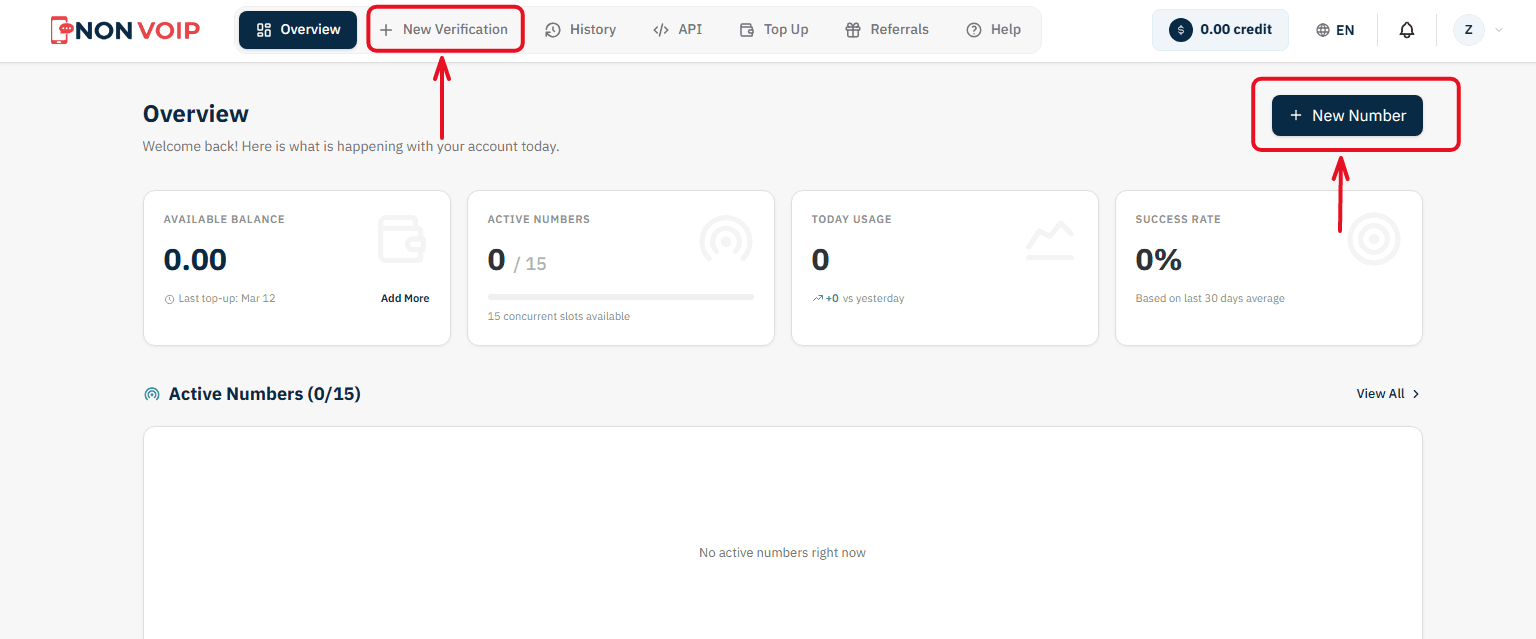
Start a New Order: From the main menu of the platform, click "New number" or click the "New Verification" button located in the top bar of the dashboard.
Select a Service: A list of available applications will appear. Search for and select "OpenAI".
(You can click the star icon next to it to add it to your "Favorites" list for quick access later).Select Country: From the list of supported countries, choose the United States.
Select a Server: The platform will display several available servers for this service (e.g., Server 1, Server 2). Each server details the cost, validity period, and support for additional features like reuse. Choose the server that fits your budget.
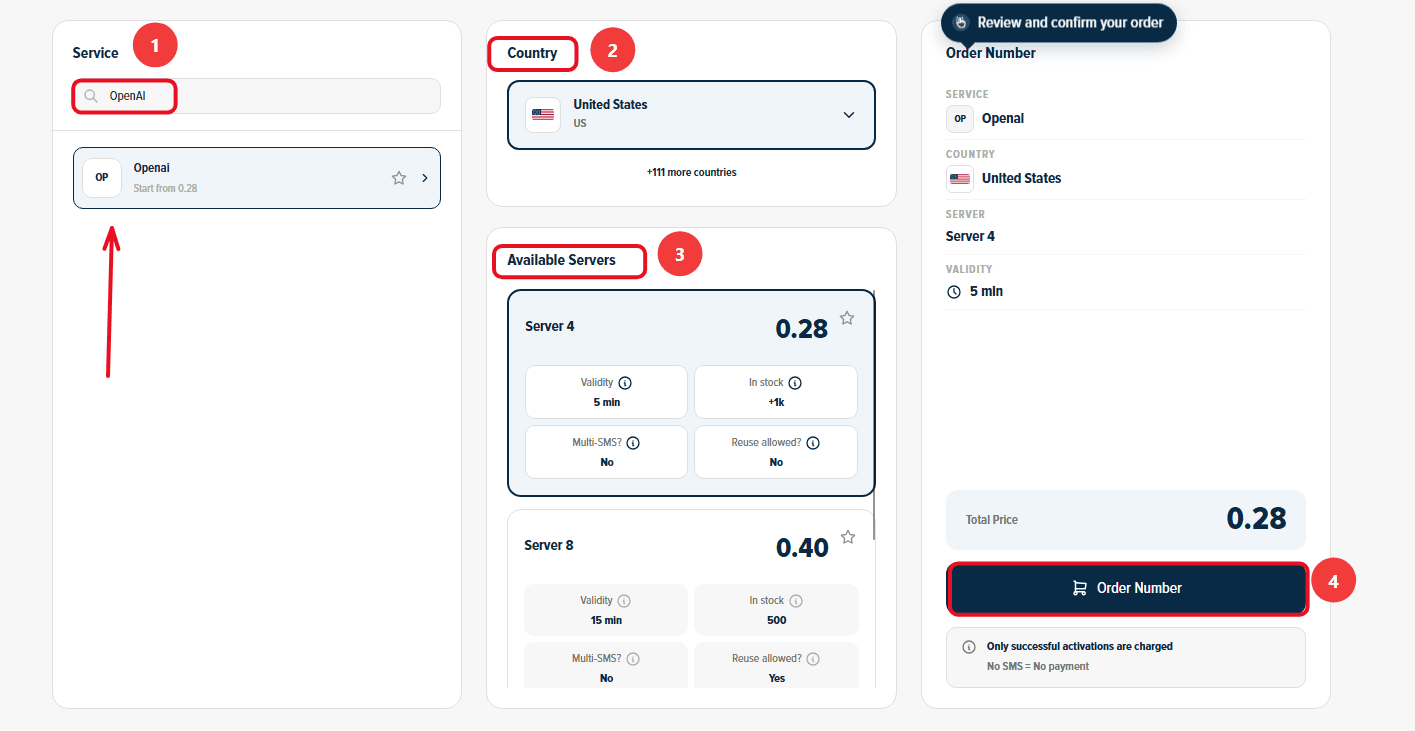
Confirm the Order: On the right section, you will find a comprehensive summary of your order. Review the details, then click "Order Number" to immediately allocate a real US number to you and start the waiting session.
Stage 2: Activating the Number in OpenAI
Now you are ready to link the number to your new account:
Open OpenAI on your phone and start the steps to create a new account.
Copy the phone number displayed on the order card on the Non-VoIP platform and paste it into the phone verification field inside OpenAI.
Return directly to the platform's dashboard and monitor the order card; you will see a timer showing the remaining time under the status "Awaiting SMS".
Once the OpenAI activation code arrives, it will appear immediately in the "SMS Message" field. Copy the code and enter it into the app to complete the process successfully.
Important Note: The platform offers absolute financial transparency. You can manually cancel the number before the message arrives, and if the timer expires without receiving the code, the balance will automatically return to your account according to the "No SMS = No payment" policy, allowing you to try another server.
Additional Features You Might Find Useful
Financial Protection Policy (No SMS = No Payment): If the number expires without receiving the code or you cancel it manually beforehand, the system guarantees an automatic and instant refund to your wallet.
Referral and Earnings Program: What if your network funded your next verifications? Invite your friends to the platform to get 50% off their first order, and enjoy a continuous 3% commission on every successful verification they complete (you can withdraw your earnings as USDT crypto or convert them directly into site balance!).
Frequently Asked Questions (FAQ)
Can I activate an OpenAI account completely without a phone number?
No, the company enforces SMS verification as a mandatory security measure that cannot be bypassed when creating any new account.
Will I lose my ChatGPT account if the number expires?
The number is only required for the initial verification process to prove you are a real user. After activation, logins are typically done using your email and password, and the system will not ask you for the number again except in very rare cases related to changing security settings.
Can I use the same number to activate multiple OpenAI accounts?
The platform's policies prevent linking a large number of accounts to the same phone number. Therefore, it is always recommended to generate a new number for each account you wish to create to ensure its stability and avoid bans.
In Conclusion
Establishing an account on leading artificial intelligence platforms is no longer a luxury, but an essential tool for boosting productivity.
By understanding how security filters operate and relying on trusted tools like advanced VPN networks and real numbers from the Non-VoIP platform, you will be able to bypass any technical barriers and access OpenAI's full potential with complete ease and security.