FinTech banks like Green Dot are a preferred choice for many thanks to their prepaid cards and flexible bank accounts that facilitate electronic payments and receiving funds.
However, when attempting to register, many users hit a strict security barrier: the necessity of a real US phone number to create the account.
If you are looking for how to activate a Green Dot account with a real US number without facing an instant ban or registration rejection, you need to understand the security mechanism this bank uses and how to bypass it legitimately and technically.
Quick Summary (TL;DR)
To successfully activate a Green Dot account with a real US number, you must completely avoid free virtual phone numbers (VoIP), as the bank's systems detect them instantly and ban the account.
The most reliable technical solution is using the Non-VoIP platform to get a real US number (SIM-based) linked to an actual telecom network.
This number guarantees you instantly receive the verification code (OTP) and bypass bank security filters, backed by a full refund guarantee if the message does not arrive.
Why Does Green Dot Impose Strict Phone Verification Restrictions?
Green Dot does not request a phone number merely as a registration routine; it is legally and securely obligated to do so for several reasons:
Know Your Customer (KYC) Policy: Green Dot is subject to US anti-money laundering laws, which mandate precise verification of every user's identity.
Combating Financial Fraud: A real phone number acts as a trust factor proving the account belongs to a real person, not an automated bot attempting to open fake accounts en masse.
Securing Transactions: The number is later used to send security alerts and verification codes when making transfers or changing sensitive data.
Why Do Free VoIP Numbers Fail to Activate a Green Dot Account?
Many mistakenly resort to apps that provide free US numbers, only to be surprised by an error message or an account closure seconds after creation.
The reason is purely technical: US banks operate databases connected to telecom service providers, and their algorithms check the "type" of the number before sending the verification code.
If the number is classified as VoIP (a virtual number generated online), it is rejected immediately because it lacks reliability and is easily utilized in fraud. Conversely, real numbers (Non-VoIP) appear in the system as numbers belonging to trusted US telecom companies, giving the account the green light.
Read also: What is the difference between VoIP and Non-VoIP numbers and why do websites reject them?
Steps to Activate a Green Dot Account With a Real US Number
Follow these simple steps to activate a Green Dot account with a real US number:
Stage 1: Buying the Number from Non-VoIP
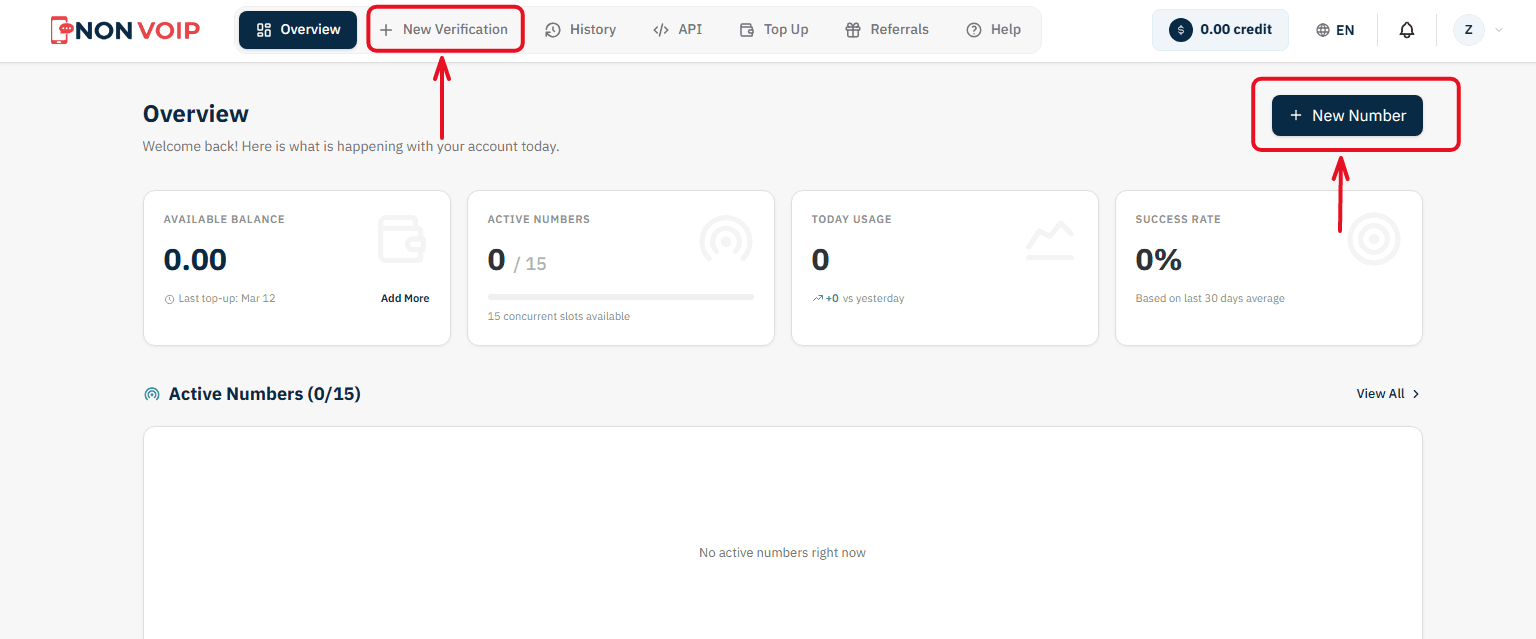
Start a New Order: From the main menu of the platform, click "New number" or click the "New Verification" button located in the top bar of the dashboard.
Select a Service: A list of available applications will appear. Search for and select "Green Dot".
(You can click the star icon next to it to add it to your "Favorites" list for quick access later).Select Country: From the list of supported countries, choose the United States.
Select a Server: The platform will display several available servers for this service (e.g., Server 1, Server 2). Each server details the cost, validity period, and support for additional features like reuse. Choose the server that fits your budget.
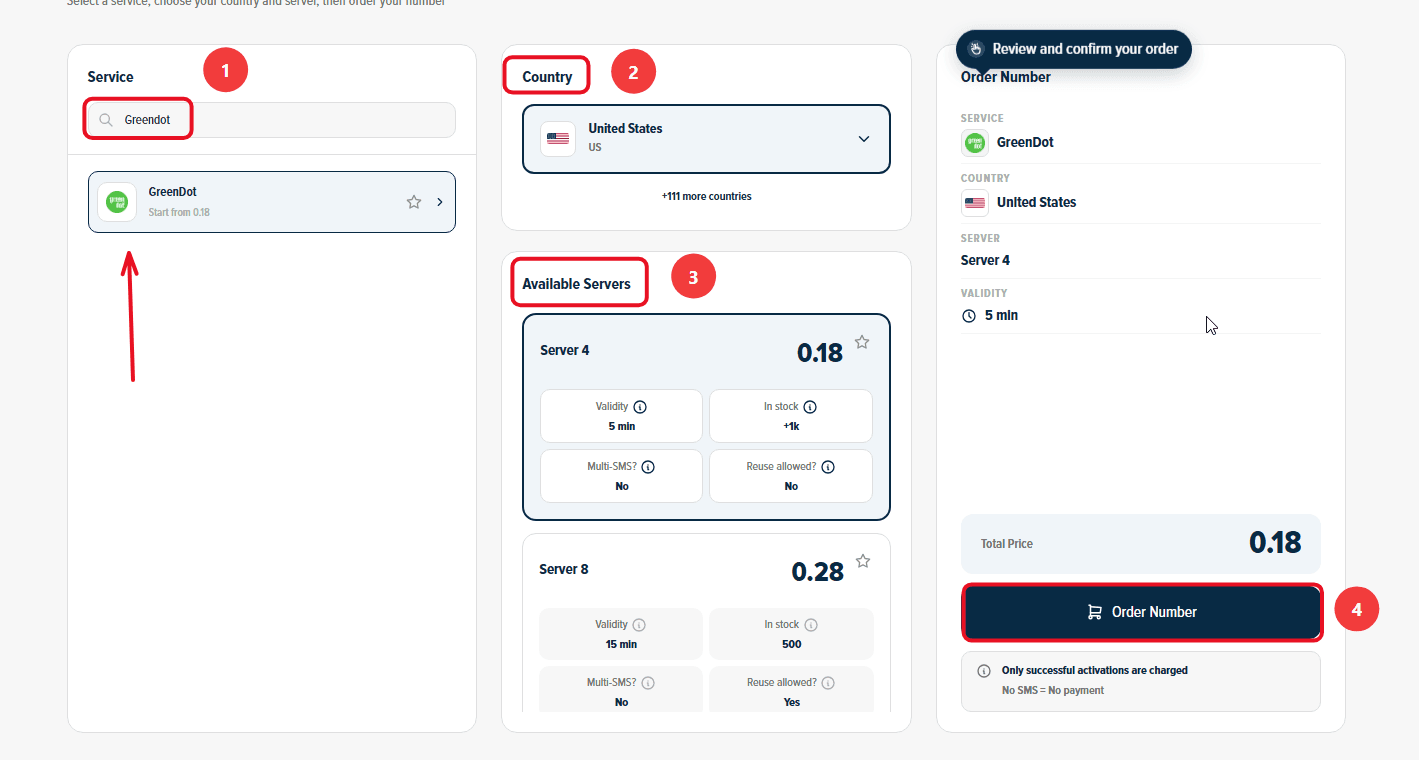
Confirm the Order: On the right section, you will find a comprehensive summary of your order. Review the details, then click "Order Number" to immediately allocate a real US number to you and start the waiting session.
Stage 2: Activating the Number in Green Dot
Now you are ready to link the number to your new account:
Open Green Dot on your phone and start the steps to create a new account.
Copy the phone number displayed on the order card on the Non-VoIP platform and paste it into the phone verification field inside Green Dot.
Return directly to the platform's dashboard and monitor the order card; you will see a timer showing the remaining time under the status "Awaiting SMS".
Once the Green Dot activation code arrives, it will appear immediately in the "SMS Message" field. Copy the code and enter it into the app to complete the process successfully.
Important Note: The platform offers absolute financial transparency. You can manually cancel the number before the message arrives, and if the timer expires without receiving the code, the balance will automatically return to your account according to the "No SMS = No payment" policy, allowing you to try another server.
Additional Features You Might Find Useful
Financial Protection Policy (No SMS = No Payment): If the number expires without receiving the code or you cancel it manually beforehand, the system guarantees an automatic and instant refund to your wallet.
Referral and Earnings Program: What if your network funded your next verifications? Invite your friends to the platform to get 50% off their first order, and enjoy a continuous 3% commission on every successful verification they complete (you can withdraw your earnings as USDT crypto or convert them directly into site balance!).
Frequently Asked Questions (FAQ)
Can I activate a Green Dot account with a free virtual number?
No, the bank's systems strictly reject virtual VoIP numbers and instantly ban accounts associated with them. It requires a real (SIM-based) number like those available on the Non-VoIP platform.
Will I lose my account if I no longer own the number later?
The number is primarily used to bypass the initial registration hurdle and prove reliability.
Once activated, it is highly recommended to rely on an Authenticator app or link the account to a strong email address for future account recovery, avoiding frequent logouts or device changes that might trigger SMS re-verification.
Why does the bank ask for identity verification (SSN) after entering the number?
Activating the phone number is the first security step, but US banks also require a Social Security Number (SSN) or a valid US ID to open a fully functional bank account.
Ensure you meet the legal requirements or look for alternative financial accounts suitable for non-residents if you are located outside the US.
In Conclusion
Activating US financial accounts is no longer as easy as it used to be, as security algorithms have become smarter and much stricter.
However, understanding the technical difference between virtual and real numbers puts you on the right path. Using a real US number via the Non-VoIP platform not only saves you time but also protects your account from sudden closures and grants you the reliability demanded by a major financial platform like Green Dot.