Are you struggling to bypass the phone verification step when creating a Viber account? Today's banking algorithms strictly reject virtual numbers.
In this guide, we reveal the technical steps on how to activate a Viber account using a US number (SIM-based) to bypass instant rejection messages and securely access your banking dashboard with ease.
Quick Summary (TL;DR)
To activate a Viber account using a US number and avoid bans or phone number rejections, you can rely on the Non-VoIP platform to obtain a real, dedicated number linked to a physical SIM card.
The process boils down to quickly logging into the platform, selecting the "Viber" service, choosing a US server that fits your budget, and then copying the number to use during account setup.
You will receive the verification code instantly on your dashboard, with a full refund guarantee if the message does not arrive.
Why Does Viber Reject VoIP Numbers and Require Non-VoIP?
Viber's security systems rely on highly precise algorithms to verify user identities and prevent fake accounts or digital fraud. Here is the decisive technical difference:
| Technical Criteria | Non-VoIP Numbers (The Ultimate Solution) | VoIP Numbers (The Free Trap) |
|---|---|---|
| Source | Real telecom companies (Mobile SIM) | Fake internet software and apps |
| Reliability | Very high | Low (leads to account bans or number rejection) |
| Security | Dedicated for your personal, temporary use | Pooled and vulnerable to platform restrictions and bans |
| Code Reception | Instant and guaranteed (SMS OTP) with a refund policy | Often fails to arrive or gets delayed due to auto-blocks |
Read also: What is the difference between VoIP and Non-VoIP numbers and why do websites reject them?
Steps to Activate a Viber Account Using a US Number
Follow these simple steps to acquire a phone number to activate a Viber account:
Stage 1: Buying the Number from Non-VoIP
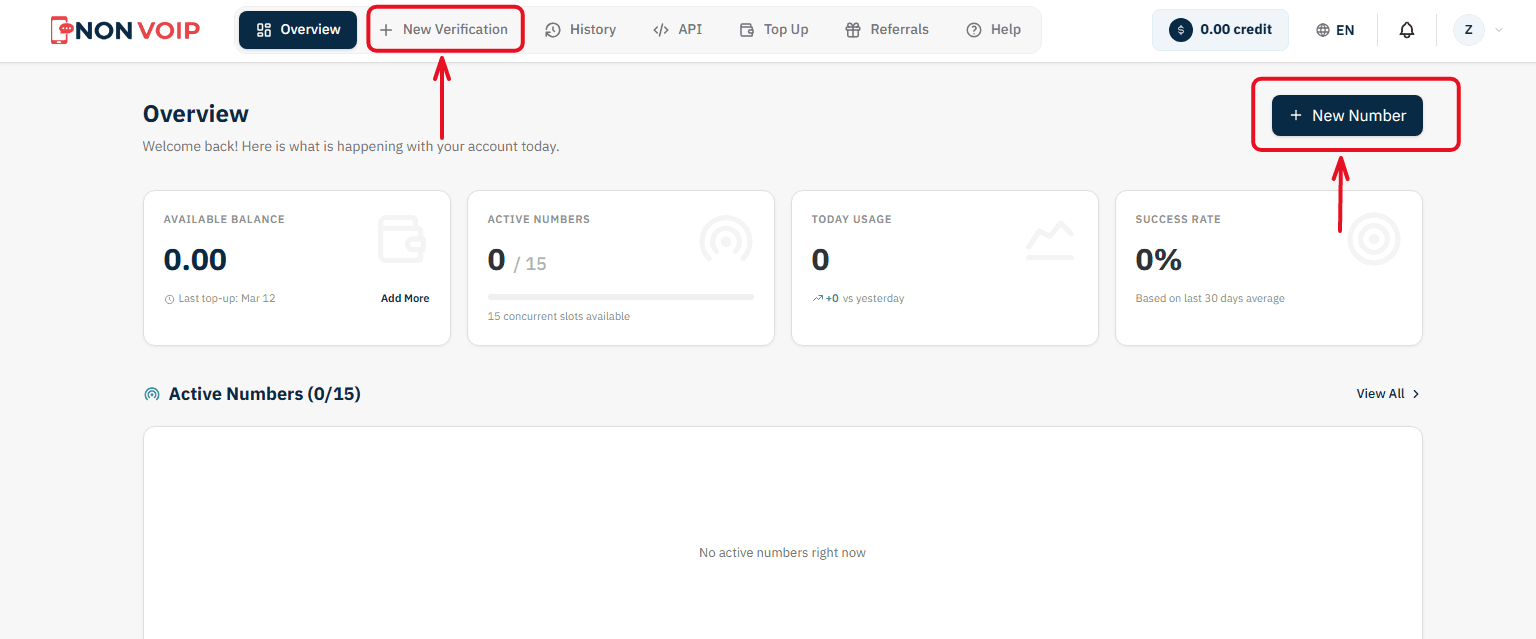
Start a New Order: From the main menu of the platform, click "New number" or click the "New Verification" button located in the top bar of the dashboard.
Select a Service: A list of available applications will appear. Search for and select "Viber".
(You can click the star icon next to it to add it to your "Favorites" list for quick access later).Select Country: From the list of supported countries, choose the United States.
Select a Server: The platform will display several available servers for this service (e.g., Server 1, Server 2). Each server details the cost, validity period, and support for additional features like reuse. Choose the server that fits your budget.
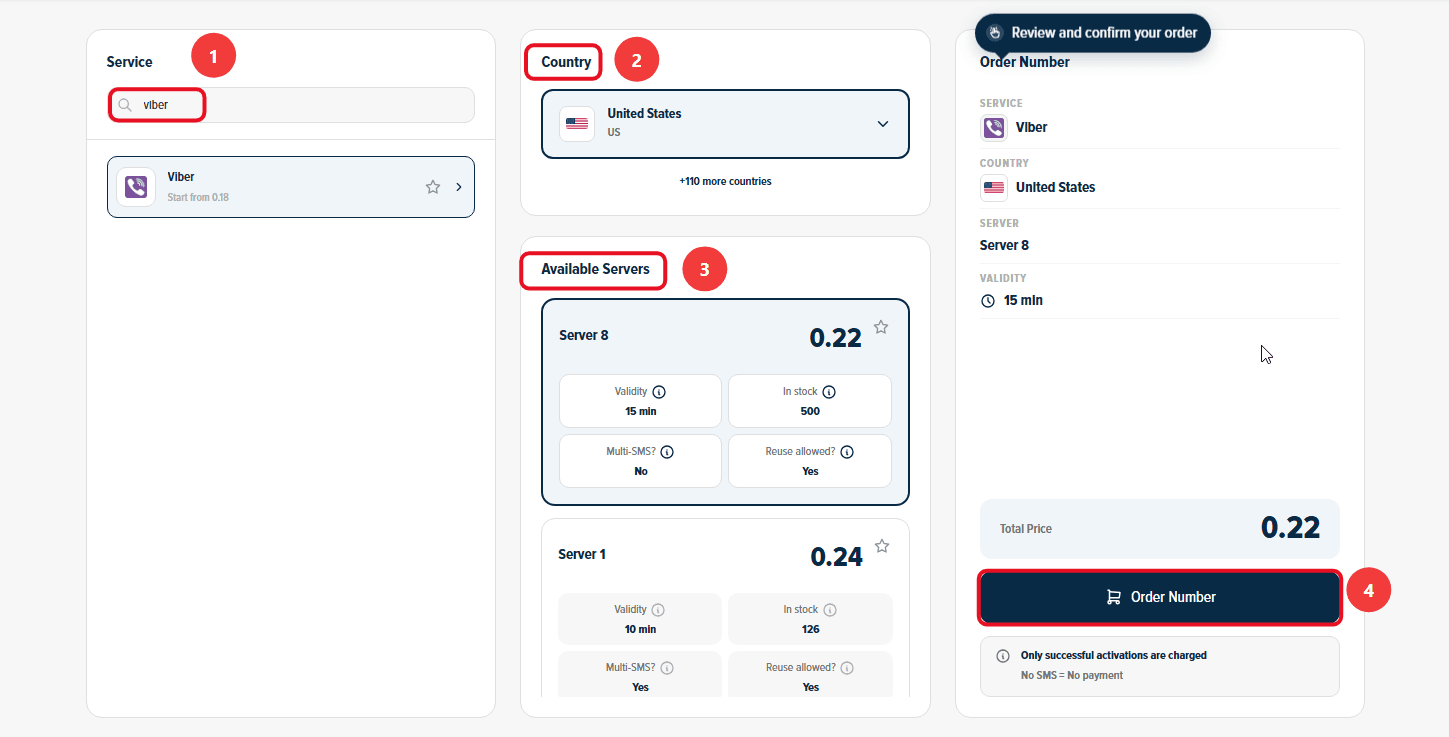
Confirm the Order: On the right section, you will find a comprehensive summary of your order. Review the details, then click "Order Number" to immediately allocate a real US number to you and start the waiting session.
Stage 2: Activating the Number in Viber
Now you are ready to link the number to your new account:
Open Viber on your phone and start the steps to create a new account.
Copy the phone number displayed on the order card on the Non-VoIP platform and paste it into the phone verification field inside Viber.
Return directly to the platform's dashboard and monitor the order card; you will see a timer showing the remaining time under the status "Awaiting SMS".
Once the Viber activation code arrives, it will appear immediately in the "SMS Message" field. Copy the code and enter it into the app to complete the process successfully.
Important Note: The platform offers absolute financial transparency. You can manually cancel the number before the message arrives, and if the timer expires without receiving the code, the balance will automatically return to your account according to the "No SMS = No payment" policy, allowing you to try another server.
Additional Features You Might Find Useful
Financial Protection Policy (No SMS = No Payment): If the number expires without receiving the code or you cancel it manually beforehand, the system guarantees an automatic and instant refund to your wallet.
Referral and Earnings Program: What if your network funded your next verifications? Invite your friends to the platform to get 50% off their first order, and enjoy a continuous 3% commission on every successful verification they complete (you can withdraw your earnings as USDT crypto or convert them directly into site balance!).
Frequently Asked Questions (FAQ)
Is a phone number alone enough to open a full bank account at Viber?
No, verifying the phone number is the fundamental technical requirement for communication and receiving OTPs. However, opening a bank account also requires fulfilling the bank's legal requirements (such as proof of identity, address, or an SSN/Tax ID according to resident or international terms).
Why do I get an error message when using a free phone number?
Viber's systems inspect the carrier type and reject VoIP numbers because they are not linked to a real SIM card and are considered a potential source of fraud.
Can I rely on other authentication methods after activation?
Yes. After successfully completing the initial activation step, it is highly recommended to enable additional authentication options available within the bank's app (such as biometric login via fingerprint or facial recognition) to reduce the constant need to request SMS codes for daily logins.
Conclusion
Managing banking transactions through Viber requires strict compliance with the security standards imposed by the US banking system.
Choose your real number now via the Non-VoIP platform, and bypass registration restrictions with ease.